Looks like the Railo team have been slowly migrating documentation on the various tags across from the old wiki to Github wiki. If you are like me, and like to refer to documentation every now and then, it is a bit pain to search for a particular function or tag in the Github wiki.
Google and Alfred come to rescue.
Suppose you want to see documentation on the cfcontent tag, first you get Google to do the hard work for you by entring the following in the search bar of your browser:
http://www.google.com/search?q=cfcontent&as_sitesearch=github.com%2Fgetrailo%2Frailo%2Fwiki%2F&q=cfcontent+site:github.com%2Fgetrailo%2Frailo%2Fwiki%2F
As you can see you can specify the URL to search (which is the Railo Github wiki) and query as ‘cfcontent’.
As you want to search for different terms you can substitute ‘cfcontent’ with the name of the ColdFusion function/tag you want more information on.
But it soon gets a pain in the neck as you have manually hack the URL each time.
That is where Alfred comes in very handy.
Create a Custom Search (in Preferences > Web Search). Use the following URL, and test.
http://google.com/search?q={query}&as_sitesearch=github.com%2Fgetrailo%2Frailo%2Fwiki%2F
Give the keyword ‘railo’ or whatever suits your fancy.
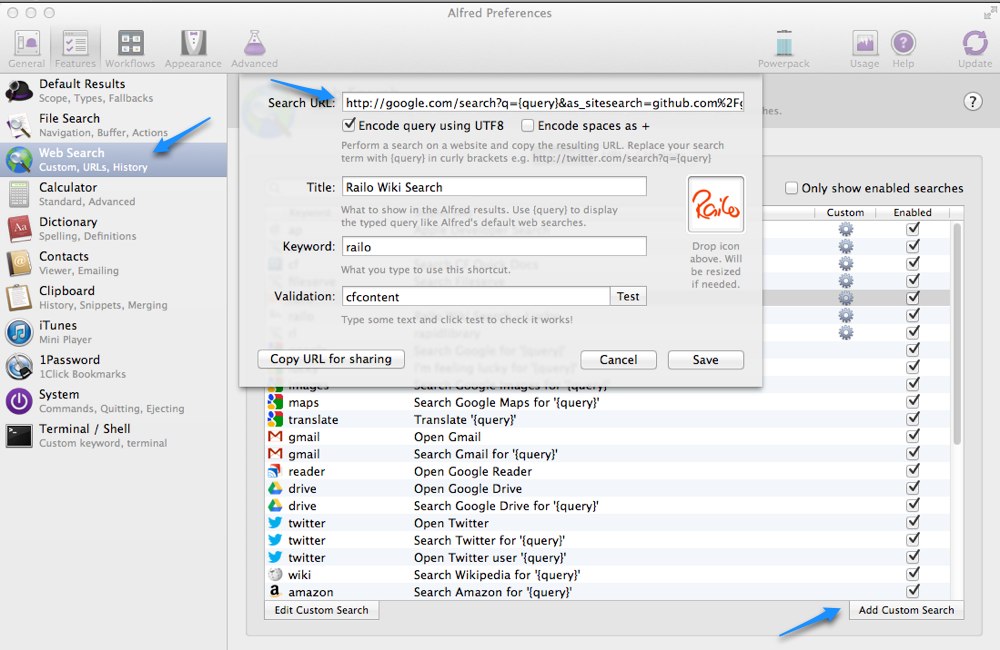
To make this even better, you can use use the “I’m Feeling Lucky” functionality of Google Search to directly take you to the first page of the search results. You can create another custom search in Alfred using the following URL.http://www.google.com/search?btnI=I%27m+Feeling+Lucky&ie=UTF-8&oe=UTF-8&q={query}&as_sitesearch=github.com%2Fgetrailo%2Frailo%2Fwiki%2F
Now, whenever you launch Alfred, and use the keyword ‘railo’ or whatever you set up, you can type the name of the ColdFusion tag/function after they keyword, and it will open up the search results from Railo Github wiki in your browser!
If you use another program like Alfred, the same URLs can be used in the format that suits those programs.
 Introducing Sublimate — a Mac-only application to open files/folders in